Obsidian Habit Tracker: Monthly Grids + Dataview Dashboard
Quick install: unzip the file and open the folder as a vault in Obsidian, or copy the templates into your existing vault. Full install guide
What plugins you need
- Required
- core Templates
- Optional
- Dataview
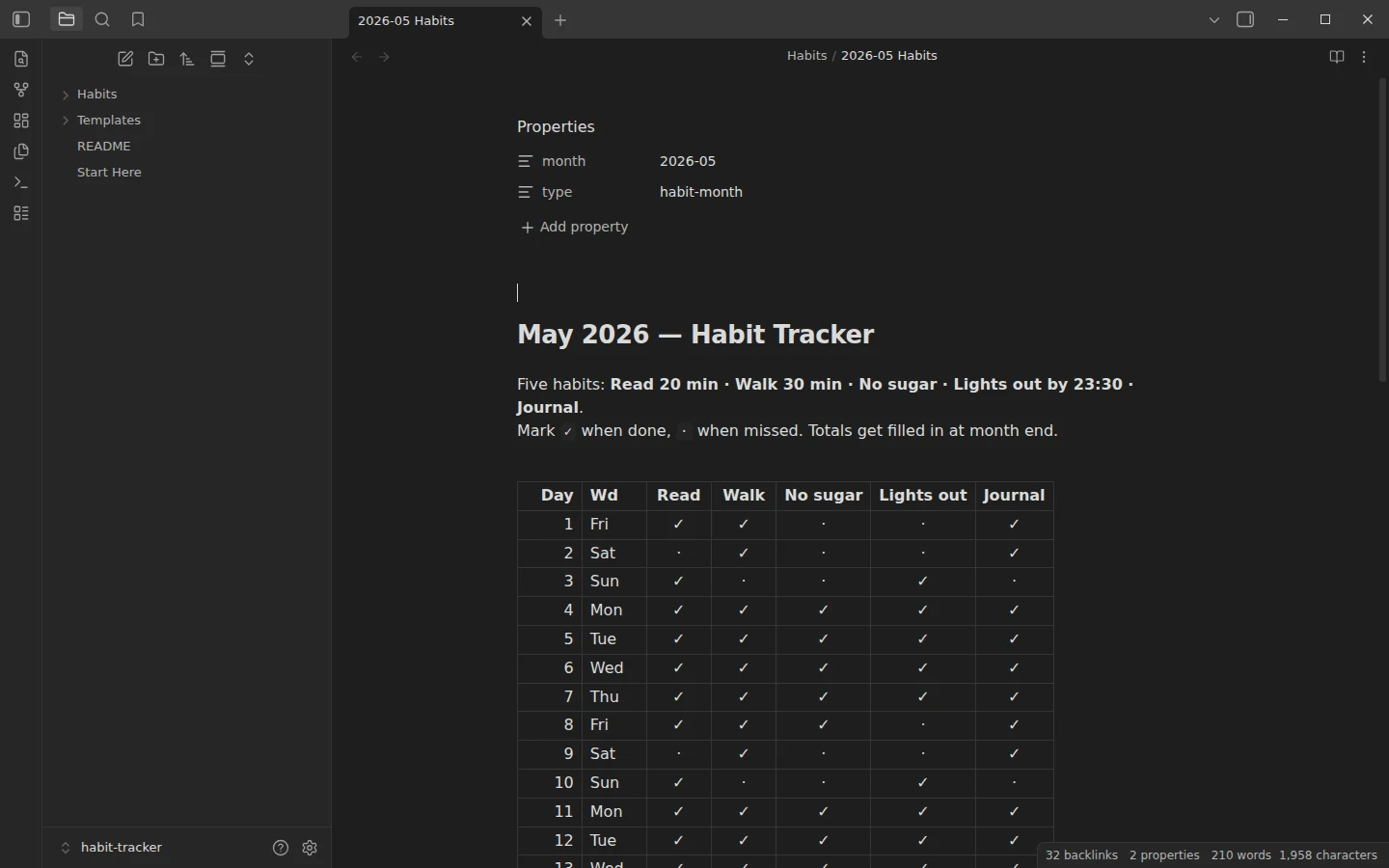
This Obsidian habit tracker works at two levels, and you pick the one that matches your patience. The simple level is a monthly grid: one note per month, days down, habits across, a check or a dot in each cell — plain Markdown tables, zero plugins. The advanced level is a tiny note per day with the habits as true/false frontmatter, summarized by a Dataview dashboard that computes streaks, monthly totals and perfect days. The download runs both in parallel so you can compare them on the same data.
What's inside this Obsidian habit tracker
- Habits/ — two fully tracked example months: 2026-04 Habits and 2026-05 Habits, grids filled day by day with totals at the bottom.
- Habits/Daily Log/ — 61 per-day log notes (April 1 to May 31, 2026), each carrying five habits as frontmatter booleans. This is what the dashboard reads.
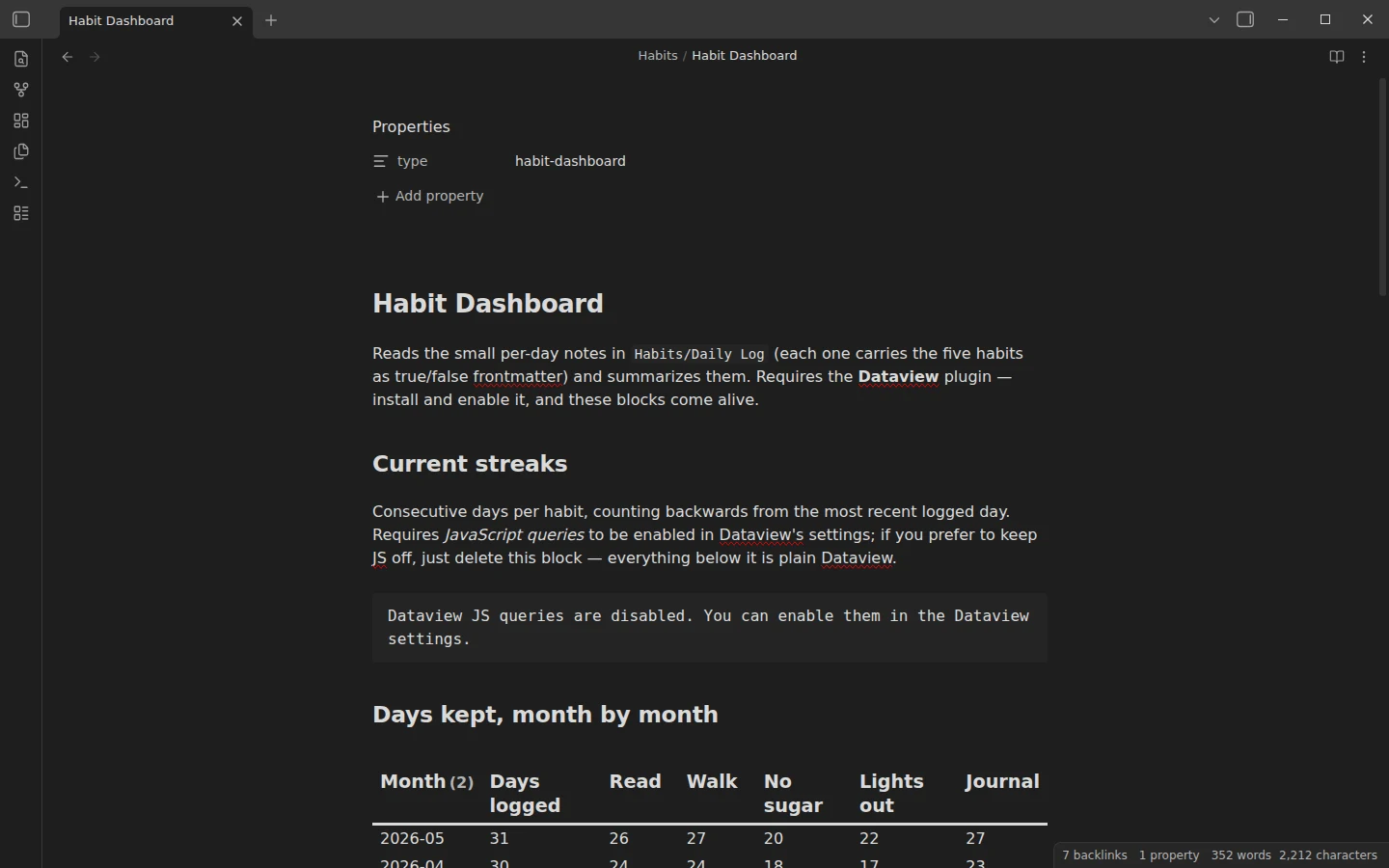
- Habits/Habit Dashboard.md — current streaks, days kept month by month, the last 14 logged days, and a list of perfect days.
- Templates/ — Monthly Habit Tracker (a blank grid for a new month) and Habit Log Entry (the under-a-minute daily log).
The example habits are deliberately everyday — read 20 minutes, walk 30 minutes, no sugar, lights out by 23:30, journal — and the data is deliberately imperfect: weekend slumps, a flat visitor weekend in mid-May, a recovery the day after. Real tracking looks like that, and both views tell the same story.
How tracking habits works day to day
The grid way: open the month note in the evening and mark each habit with a check or a dot. You can read a filled grid like a chart — the weekend pattern in the May example is visible without a single query. The log way: create today's note in Daily Log/ from the template and flip the false values to true; the whole ritual takes under a minute. For a new month, insert the Monthly Habit Tracker template and rename the columns to your own habits — five at most, fewer is better. Missed days get a quiet dot, not a red mark: the grid's job is honesty, not guilt.
Streaks and totals with the Dataview dashboard
The monthly grids need no plugins at all. Dataview is required only for the dashboard: three of its blocks are plain Dataview queries (monthly totals, last 14 days, perfect days), and the streaks block uses a JavaScript query — enable JavaScript queries in Dataview's settings, or delete that one block and keep the rest. The frontmatter keys are the contract between the daily logs and the dashboard, so if you rename a habit, change it in the log template and in the queries together.
Download the habit tracker
The zip is a complete vault with a plain-JSON .obsidian/ folder, mirrored on GitHub. Open it as its own vault or copy Habits/ and Templates/ into yours — how to install a Vaultorial template covers both. Habit tracking pairs well with the journal template — the journal habit in the example data is literally that — and with the daily planner from the same planners section.
More templates
-
 Planner Templates: Time Blocking & Habits Obsidian Daily Planner Template for Time Blocking Free Obsidian daily planner template for time blocking: Top 3 priorities, an hour-by-hour schedule and a shutdown ritual, with Day Planner support. View template →
 -
 TTRPG Templates: D&D Campaigns & Worldbuilding Obsidian D&D Character Sheet: a 5e Template That Calculates Itself Free D&D 5e character sheet for Obsidian: ability scores in properties, and Dataview works out modifiers, skills, saves, Passive Perception and spell DC. View template →
 -
 Kanban & Project Management Templates Obsidian Gantt Chart Template: Timelines Drawn from Your Task Notes Free Obsidian Gantt chart template: tasks are notes with start and end dates, and a Dataview query draws a Mermaid Gantt chart per project, by phase. View template →
 -
 Meeting Note Templates for Work Obsidian CRM Template: A Personal CRM Vault with Contacts, Deals and Follow-ups Free Obsidian CRM template: contacts, companies, deals and dated interactions, with a Dataview dashboard for follow-ups, pipeline by stage and cold contacts. View template →