Obsidian Daily Planner Template for Time Blocking
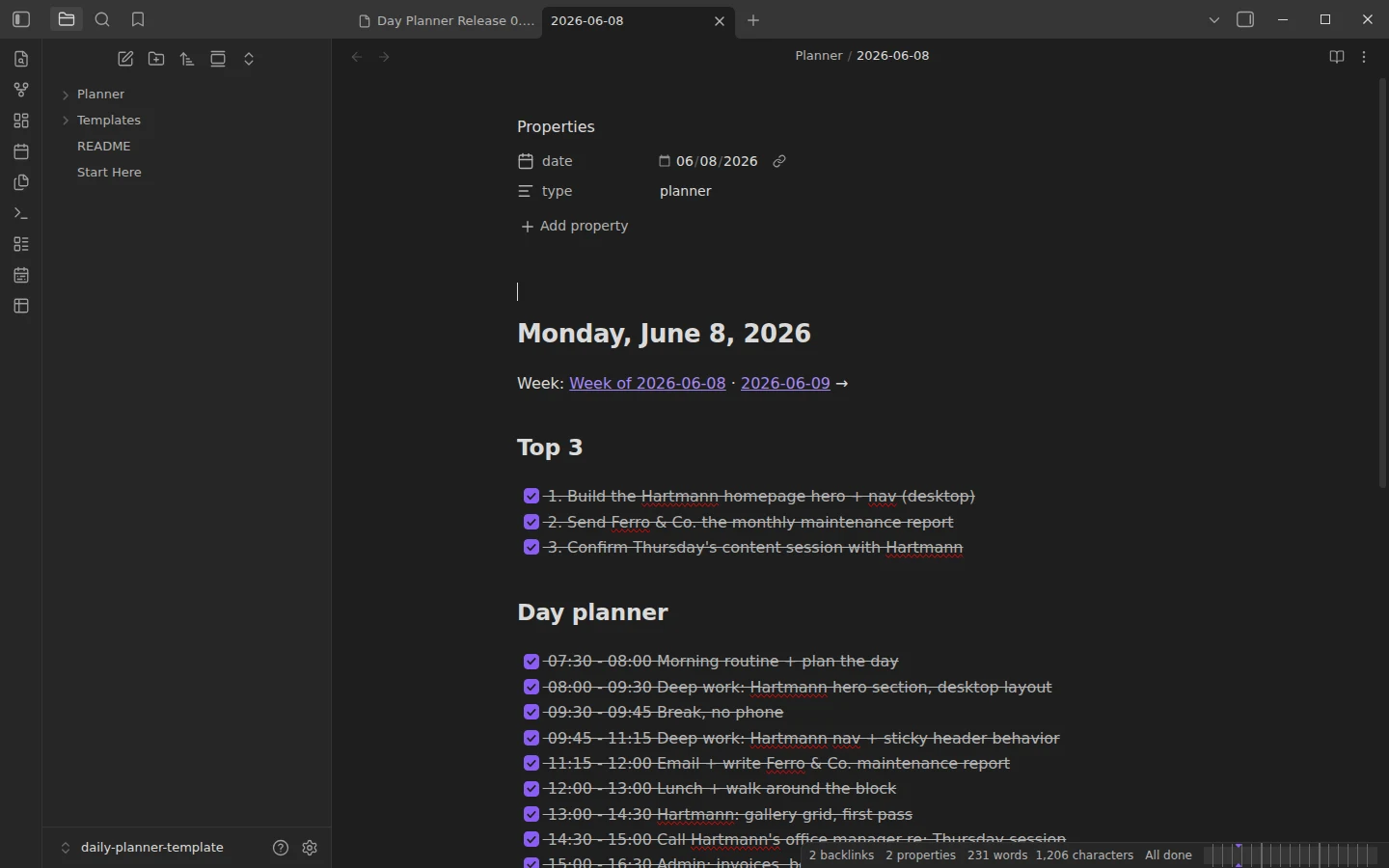
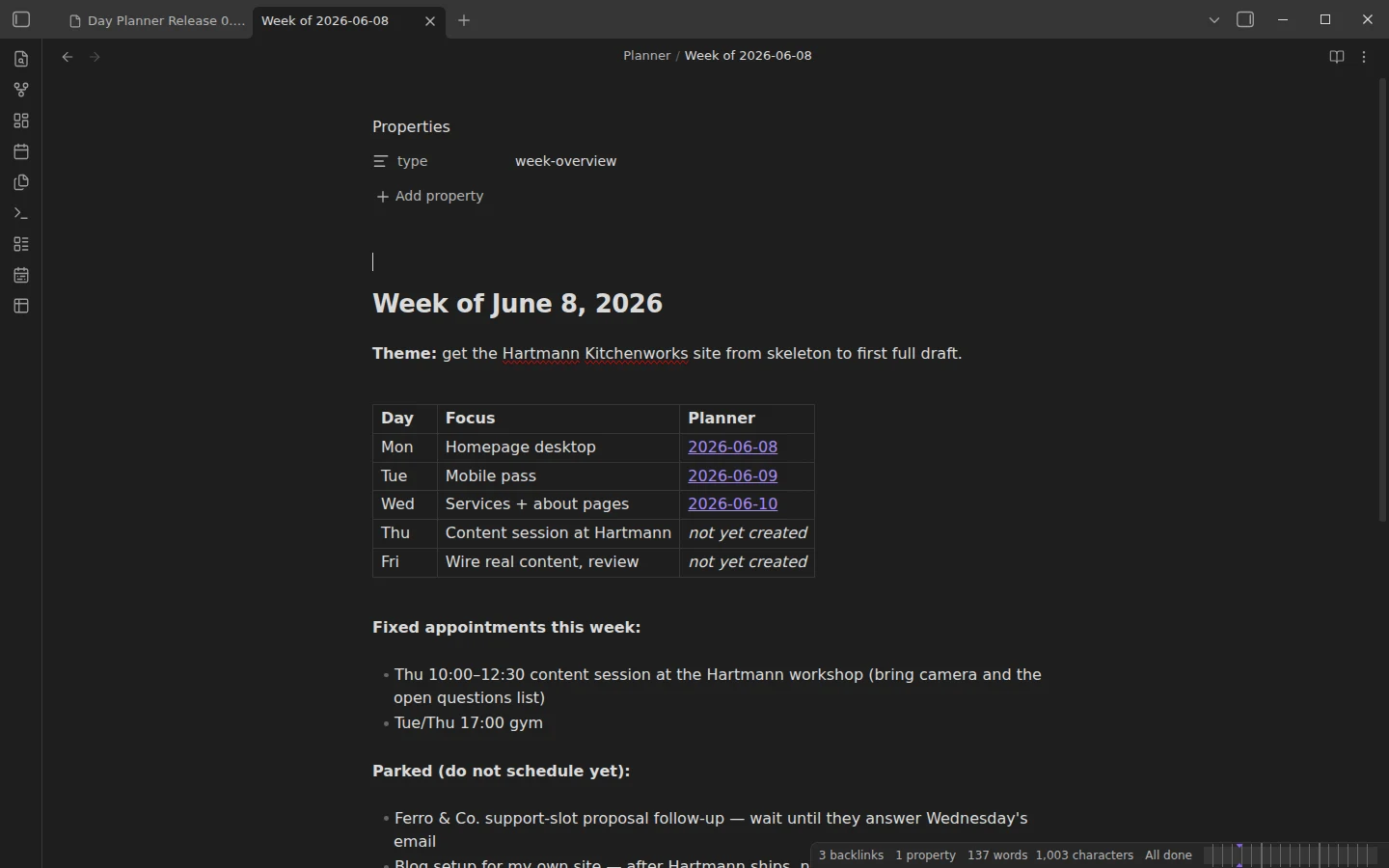
Quick install: unzip the file and open the folder as a vault in Obsidian, or copy the templates into your existing vault. Full install guide
What plugins you need
- Required
- core Daily notescore Templates
- Optional
- Day Planner
This Obsidian daily planner template is built around time blocking: every day gets three Most Important Tasks, an hour-by-hour timeline, and a two-minute shutdown at the end. It is a different tool from a diary-style daily note — this one is a schedule you negotiate with, not a record you keep. The download is a complete vault with three filled example days and a weekly overview note.
What's inside this Obsidian daily planner template
- Planner/ — three example days, June 8–10, 2026, plus a Week of 2026-06-08 overview. The days are deliberately uneven: Monday went to plan, Tuesday did not, and Wednesday is caught mid-day with the afternoon still unchecked. That contrast is the point — you are downloading a planner that has met reality.
- Templates/ — Daily Planner, applied automatically to every new daily note, and Weekly Overview, a table with one focus per day plus fixed appointments and a parking lot for things you must not schedule yet.
- Start Here.md — the method in four rules, plus first steps.
The core Daily notes plugin is preconfigured to create planner notes in Planner/ from the template, so the calendar ribbon icon is the whole workflow.
How the daily planner works: Top 3, blocks, shutdown
Each note has three parts. The Top 3: if only these three things happen, the day was good — pick them before looking at your calendar. The Day planner timeline: checkbox lines in the form - [ ] 09:00 - 10:30 Deep work: report draft, treated as bets rather than promises; when reality interferes you move blocks, you do not abandon the list. The Shutdown: tick what happened, write what carries to tomorrow, add one line about the day. The shutdown is what makes the next morning's planning take five minutes instead of thirty.
The Day Planner plugin: optional, but worth it
Everything above works as plain Markdown checklists with core plugins only — that is how the vault ships. Installing the community Day Planner plugin upgrades the same lines into a visual schedule: it reads the HH:mm - HH:mm tasks from your daily notes automatically and renders a timeline with a live "now" marker in the sidebar. Keep the plugin's defaults and keep the time format on your timeline lines, and there is nothing else to configure.
Download the daily planner
The zip contains the whole vault with a plain-JSON .obsidian/ folder, and the same files are mirrored on GitHub. Open it as its own vault or copy Planner/ and Templates/ into yours — how to install a Vaultorial template explains both paths. If you want a lighter daily note that records the day instead of scheduling it, take the daily note template; to put a tracking layer next to the planning layer, the habit tracker lives in the same planners section.
More templates
-
 Planner Templates: Time Blocking & Habits Obsidian Habit Tracker: Monthly Grids + Dataview Dashboard Free Obsidian habit tracker: plugin-free monthly grids plus a Dataview dashboard with streaks and totals, preloaded with two tracked example months. View template →
 -
 TTRPG Templates: D&D Campaigns & Worldbuilding Obsidian D&D Character Sheet: a 5e Template That Calculates Itself Free D&D 5e character sheet for Obsidian: ability scores in properties, and Dataview works out modifiers, skills, saves, Passive Perception and spell DC. View template →
 -
 Kanban & Project Management Templates Obsidian Gantt Chart Template: Timelines Drawn from Your Task Notes Free Obsidian Gantt chart template: tasks are notes with start and end dates, and a Dataview query draws a Mermaid Gantt chart per project, by phase. View template →
 -
 Meeting Note Templates for Work Obsidian CRM Template: A Personal CRM Vault with Contacts, Deals and Follow-ups Free Obsidian CRM template: contacts, companies, deals and dated interactions, with a Dataview dashboard for follow-ups, pipeline by stage and cold contacts. View template →