Obsidian Meeting Notes Template: Team, 1-on-1, Client Call, Standup and Retro Pack
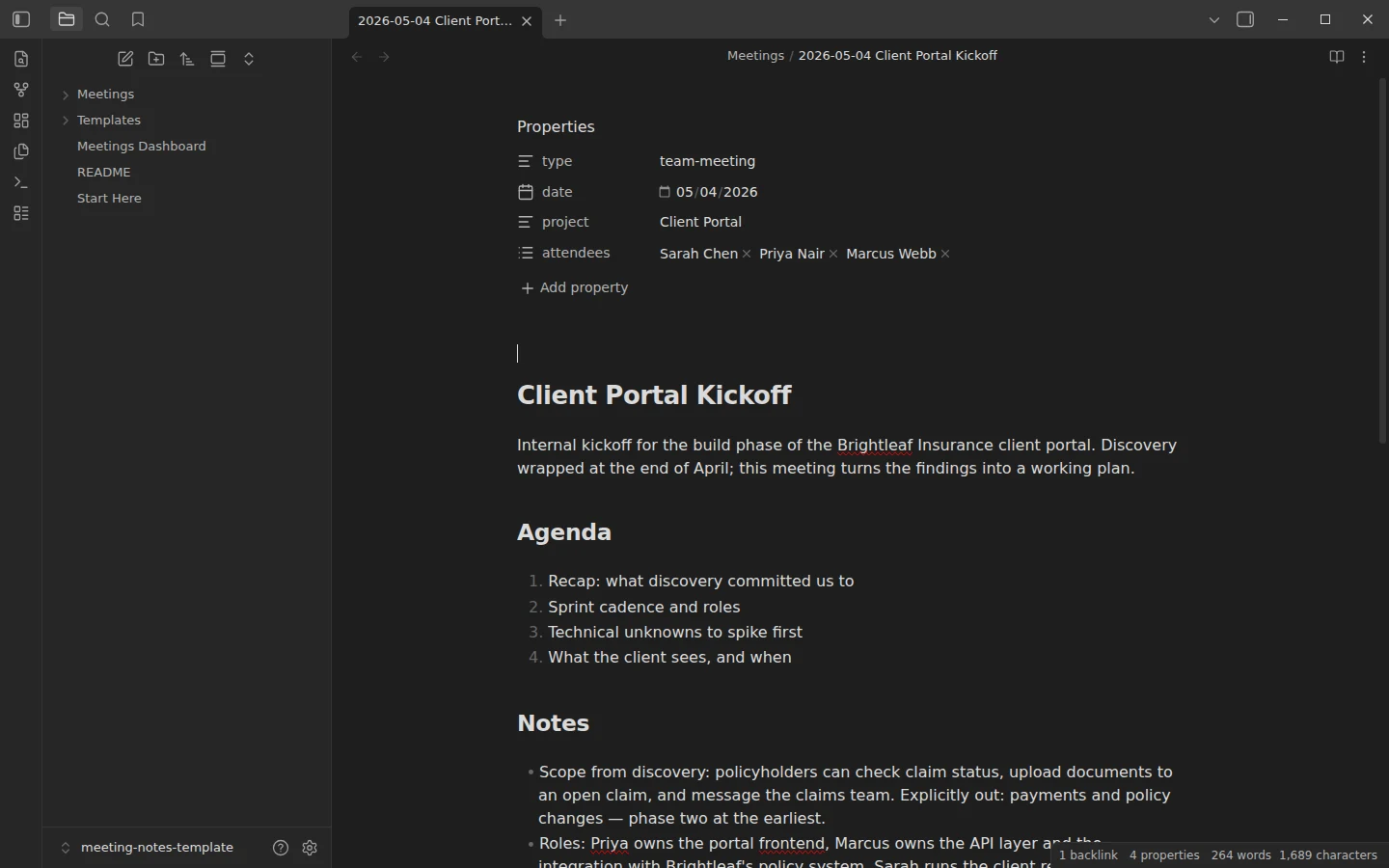
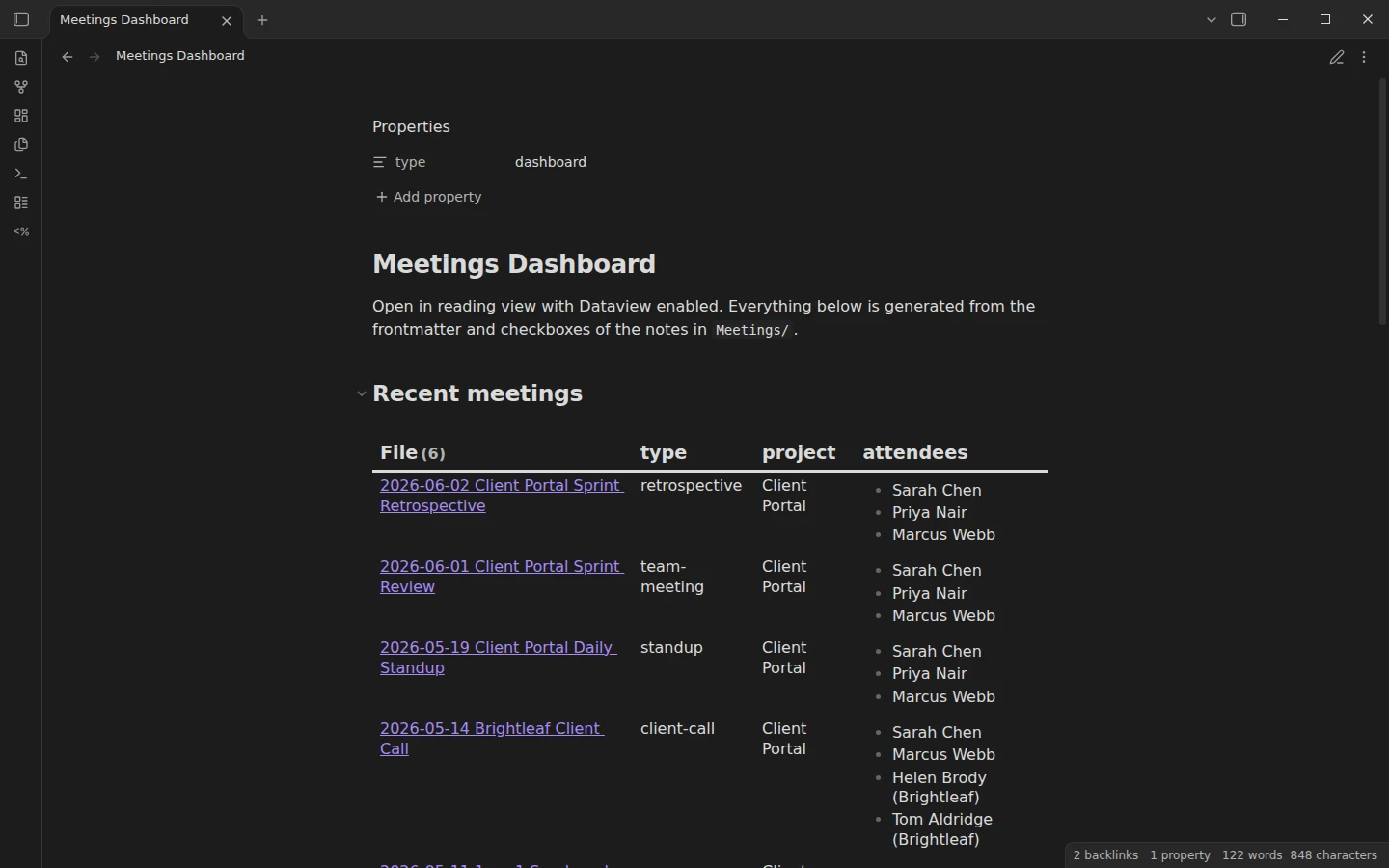
Quick install: unzip the file and open the folder as a vault in Obsidian, or copy the templates into your existing vault. Full install guide
What plugins you need
- Required
- Dataviewcore Templates
- Optional
- Templater
Meeting notes have a short shelf life: a week later, nobody re-reads the note — they search for what was decided and who owed what. This Obsidian meeting notes template is built around that fact. It packs five ready-made formats — team meeting, 1-on-1, client call, daily standup and retrospective — that share one structure, so a Dataview dashboard can pull every meeting, grouped by project and type, and every unfinished action item onto a single page.
What's inside the meeting notes template for Obsidian
The zip is a small working vault, not a loose Markdown file:
- Templates/ — Team Meeting, 1-on-1, Client Call, Daily Standup and Retrospective, each with structured frontmatter (
type,date,project,attendees) and an action items section the dashboard collects. - Meetings/ — six filled-in example meetings from one coherent consultancy project, a client portal build for an insurance client named Brightleaf: a kickoff, a 1-on-1, a client call, a daily standup, a sprint review and a retrospective, spanning 2026-05-04 to 2026-06-02.
- Meetings Dashboard — Dataview rollups: recent meetings, meetings by type, by project, and all open action items grouped by the meeting they came from.
The examples exist so the dashboard renders populated on first open. Delete them once you have a few meetings of your own.
Meeting notes in Obsidian that feed one dashboard
The conventions are deliberately strict. type is one of five exact values; project is a short label spelled identically across meetings, because the dashboard groups by it. Before a meeting, create a note in Meetings/ named YYYY-MM-DD Topic and insert the matching template. During it, write only in notes, decisions and action items. Afterwards, spend one minute giving each action item an owner and a date. Decisions get their own section on purpose: that is the part people actually come back for.
Action items are written in the Tasks plugin's due-date syntax. The dashboard only needs the checkbox part, but the format means a line written in a meeting note can be dropped into a GTD system running the Tasks plugin — like our GTD task vault — and it gets picked up as a scheduled task unchanged.
Meeting notes templates for every kind of work meeting
Each template asks for what that meeting actually produces. They all end in action items written the same way, which is what lets one dashboard list every open task.
| Template | type | Sections |
|---|---|---|
| Team Meeting | team-meeting | agenda, notes, decisions, action items |
| 1-on-1 | one-on-one | agenda with their topics first, notes, decisions, action items |
| Client Call | client-call | agenda, notes, decisions, action items |
| Daily Standup | standup | yesterday, today, blockers, action items |
| Retrospective | retrospective | what went well, what did not, what we will try, decisions, action items |
Daily standup template
Three short sections per person and a blockers list. Anything that needs a discussion goes under Blockers and becomes an action item to book its own meeting, so the standup stays short. The template looks like this:
---
type: standup
date: {{date}}
project:
attendees:
  -
---

# {{title}}

## Yesterday

-

## Today

-

## Blockers

-

## Action items

Format: `- [ ] Owner — action 📅 YYYY-MM-DD` (Tasks-plugin compatible).

- [ ]
Sprint retrospective template
What went well, what did not, and one thing to try next sprint, followed by decisions and action items. The example retrospective in the vault traces a problem first raised in the daily standup two weeks earlier, which shows why it helps to keep both kinds of meeting in the same folder.
Plugins the meeting notes pack uses
Dataview is the one required community plugin; without it the dashboard is a blank page, though the templates and notes work fine. The core Templates plugin ships enabled and pointed at Templates/. Templater is optional: the templates use core-Templates variables for date and title so they work out of the box, and Templater users can swap in dynamic commands.
Install the meeting notes template
Download the zip, unzip it, and choose Open folder as vault in Obsidian. Enable Dataview, open the dashboard in reading view, and every section should already be populated by the examples. The same vault lives on GitHub if you prefer to clone it. New to inserting templates, or unsure when Templater earns its keep? Core Templates vs Templater covers both, and the meetings and work templates category lists the neighboring downloads.
More templates
-
 Meeting Note Templates for Work Obsidian CRM Template: A Personal CRM Vault with Contacts, Deals and Follow-ups Free Obsidian CRM template: contacts, companies, deals and dated interactions, with a Dataview dashboard for follow-ups, pipeline by stage and cold contacts. View template →
 -
 TTRPG Templates: D&D Campaigns & Worldbuilding Obsidian D&D Character Sheet: a 5e Template That Calculates Itself Free D&D 5e character sheet for Obsidian: ability scores in properties, and Dataview works out modifiers, skills, saves, Passive Perception and spell DC. View template →
 -
 Kanban & Project Management Templates Obsidian Gantt Chart Template: Timelines Drawn from Your Task Notes Free Obsidian Gantt chart template: tasks are notes with start and end dates, and a Dataview query draws a Mermaid Gantt chart per project, by phase. View template →
 -
 Obsidian for Work: Meetings, Projects, Clients and the Commercial License How to use Obsidian for work: one vault for meetings, projects, clients and tasks, whether you need the commercial license, and what teams can share. Read guide →