Obsidian Homepage Template: A Dashboard for Your Vault
Quick install: unzip the file and open the folder as a vault in Obsidian, or copy the templates into your existing vault. Full install guide
What plugins you need
- Required
- Dataview
- Optional
- Homepage
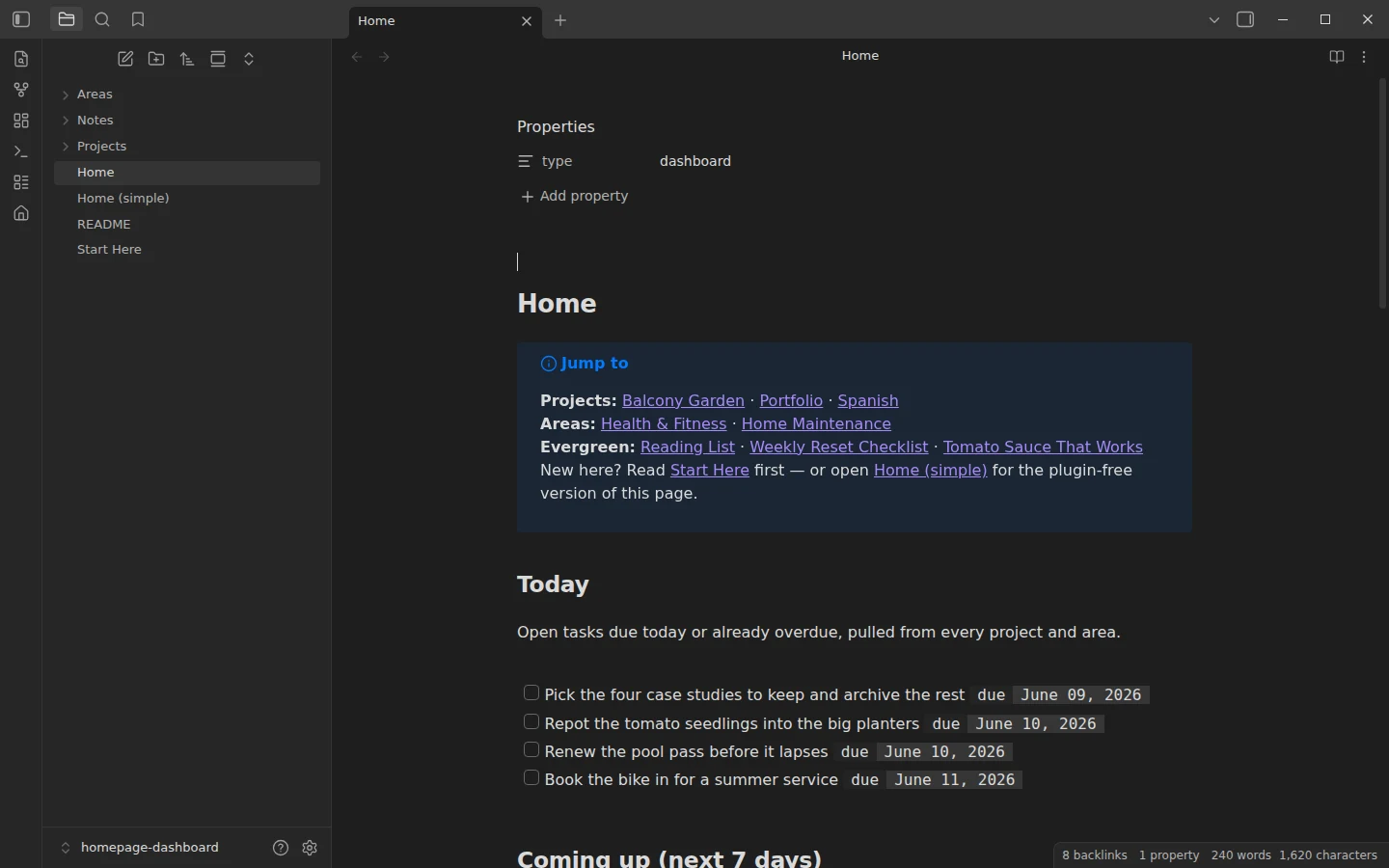
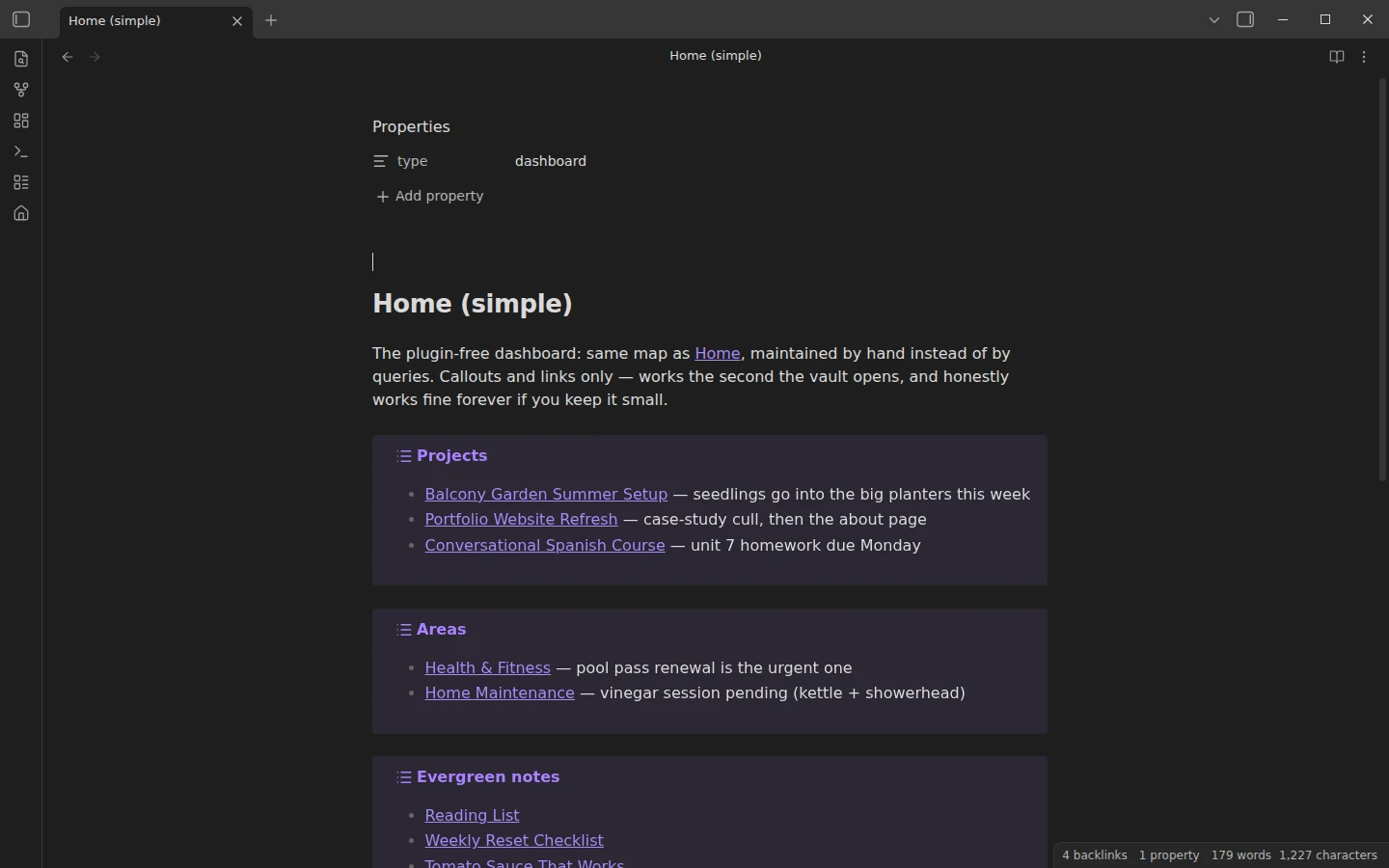
This Obsidian homepage template gives your vault a front door: one note that greets you with today's tasks, the week ahead, active projects, recent edits and quick links — instead of whatever file you had open last Tuesday. It ships in two strengths, both included: Home (simple), a plugin-free page of callouts and static links that works the second the vault opens, and Home, the live version where Dataview queries build every section for you.
What's inside this Obsidian homepage template
- Home.md — the live dashboard, powered by Dataview.
- Home (simple).md — the same map maintained by hand. Zero plugins, honestly fine forever if you keep it small.
- Projects/, Areas/, Notes/ — a small but fully cross-linked example vault: three projects, two areas and three evergreen notes, all carrying realistic dated tasks (including an overdue one or two) so every dashboard section shows real data out of the box.
- Start Here.md — the tour and first steps.
The folder split follows a simple logic: projects have an end state, areas are ongoing responsibilities, notes are evergreen reference. Replace the examples with your own life at your own pace — the queries read whatever is in the folders.
The dashboard template, section by section
The live page has five sections. Today: open tasks due today or overdue, pulled from every project and area. Coming up: the next seven days. Active projects: a table with status and start date. Recently touched: the last seven edited notes. Vault at a glance: note counts per folder. One convention makes all of it work: every actionable task carries an inline due date, like - [ ] Rewrite the about page [due:: 2026-06-12]. Date a task and forget it — the dashboard remembers. The tip baked into the vault is worth repeating: a dashboard you glance at beats a dashboard you scroll, so if a section does not change a decision at 9:00, it goes.
Plugins: Dataview for the live page, Homepage at startup
Dataview is required for Home and nothing else — Home (simple) runs with no plugins at all, so the vault is usable before you install anything. Homepage is the optional second piece: point it at your chosen dashboard and Obsidian opens it on every launch, which is the difference between having a homepage and having a note named Home. A sensible path is to start simple, then install Dataview and watch the same dashboard fill itself from your tasks' due dates.
Download the homepage template
The zip contains the complete vault with plain-JSON settings, mirrored on GitHub. Open it as its own vault to try it, or copy the two Home notes into your existing vault and adjust the folder names inside the queries to match your structure — how to install a Vaultorial template covers both routes. If the Today section becomes the part you live in, the GTD task vault is the full-depth version of that idea, and the project management template applies the same Dataview-dashboard pattern to multi-project work. More dashboards live in the dashboards section.
More templates
-
 TTRPG Templates: D&D Campaigns & Worldbuilding Obsidian D&D Character Sheet: a 5e Template That Calculates Itself Free D&D 5e character sheet for Obsidian: ability scores in properties, and Dataview works out modifiers, skills, saves, Passive Perception and spell DC. View template →
 -
 Kanban & Project Management Templates Obsidian Gantt Chart Template: Timelines Drawn from Your Task Notes Free Obsidian Gantt chart template: tasks are notes with start and end dates, and a Dataview query draws a Mermaid Gantt chart per project, by phase. View template →
 -
 Meeting Note Templates for Work Obsidian CRM Template: A Personal CRM Vault with Contacts, Deals and Follow-ups Free Obsidian CRM template: contacts, companies, deals and dated interactions, with a Dataview dashboard for follow-ups, pipeline by stage and cold contacts. View template →
 -
 Obsidian for Work: Meetings, Projects, Clients and the Commercial License How to use Obsidian for work: one vault for meetings, projects, clients and tasks, whether you need the commercial license, and what teams can share. Read guide →