Obsidian Daily Note Template: Agenda, Tasks, Log & Gratitude
Quick install: unzip the file and open the folder as a vault in Obsidian, or copy the templates into your existing vault. Full install guide
What plugins you need
- Required
- core Daily notescore Templates
- Optional
- Templater
This free Obsidian daily note template gives you one note per day with four fixed sections — Agenda, Tasks, Log and Gratitude — that you can fill in under two minutes or expand into a full journal. It downloads as a complete vault with a worked example week already inside, so you can see the system holding real life before you commit to it.
What's inside this Obsidian daily note template
The vault has three parts:
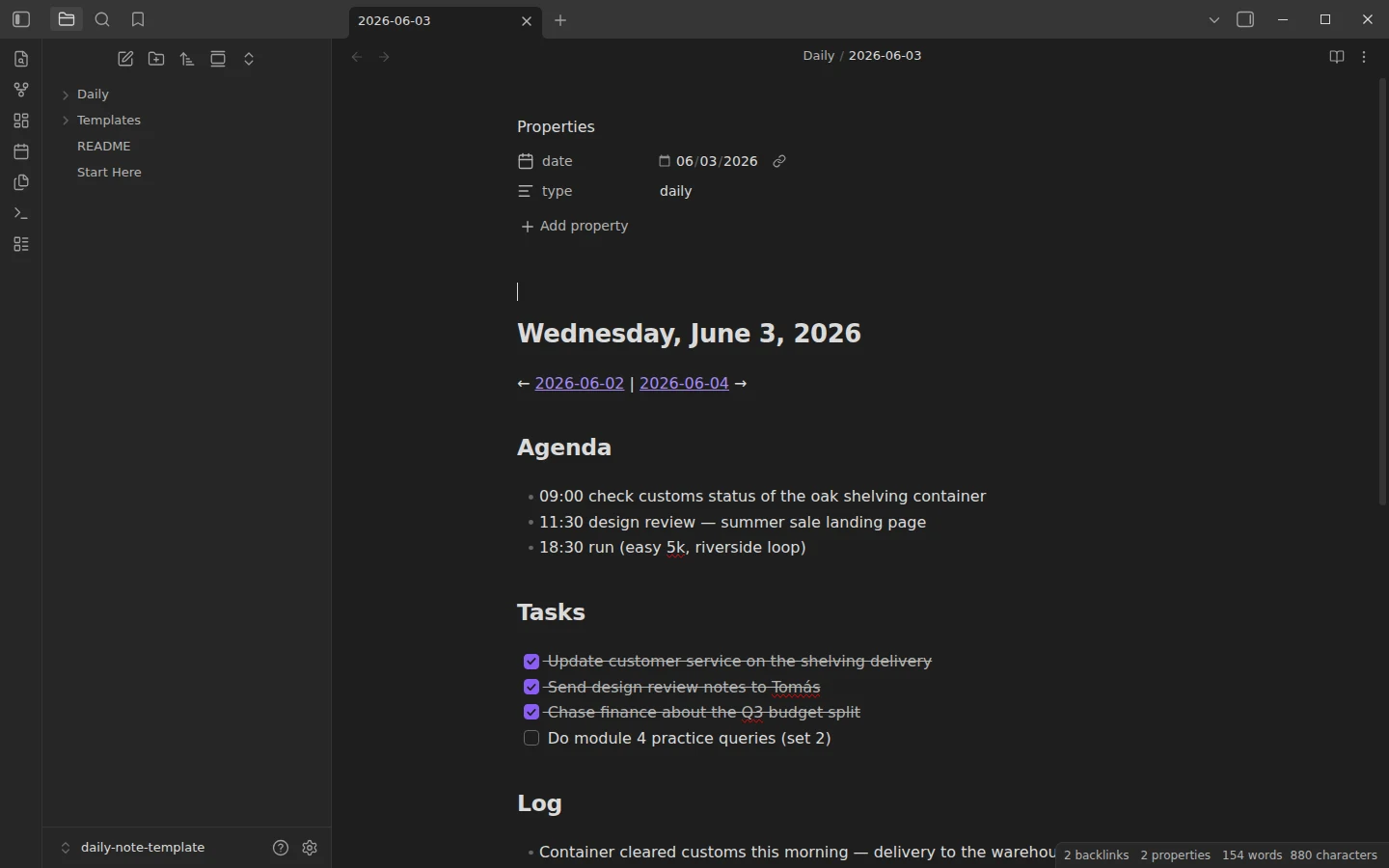
- Daily/ — seven example daily notes covering June 1–7, 2026, filled with realistic content: a kickoff that runs long, a task that slips to the next day, two-line gratitude entries. They show how the four sections behave across an ordinary week. Delete them once you have the rhythm.
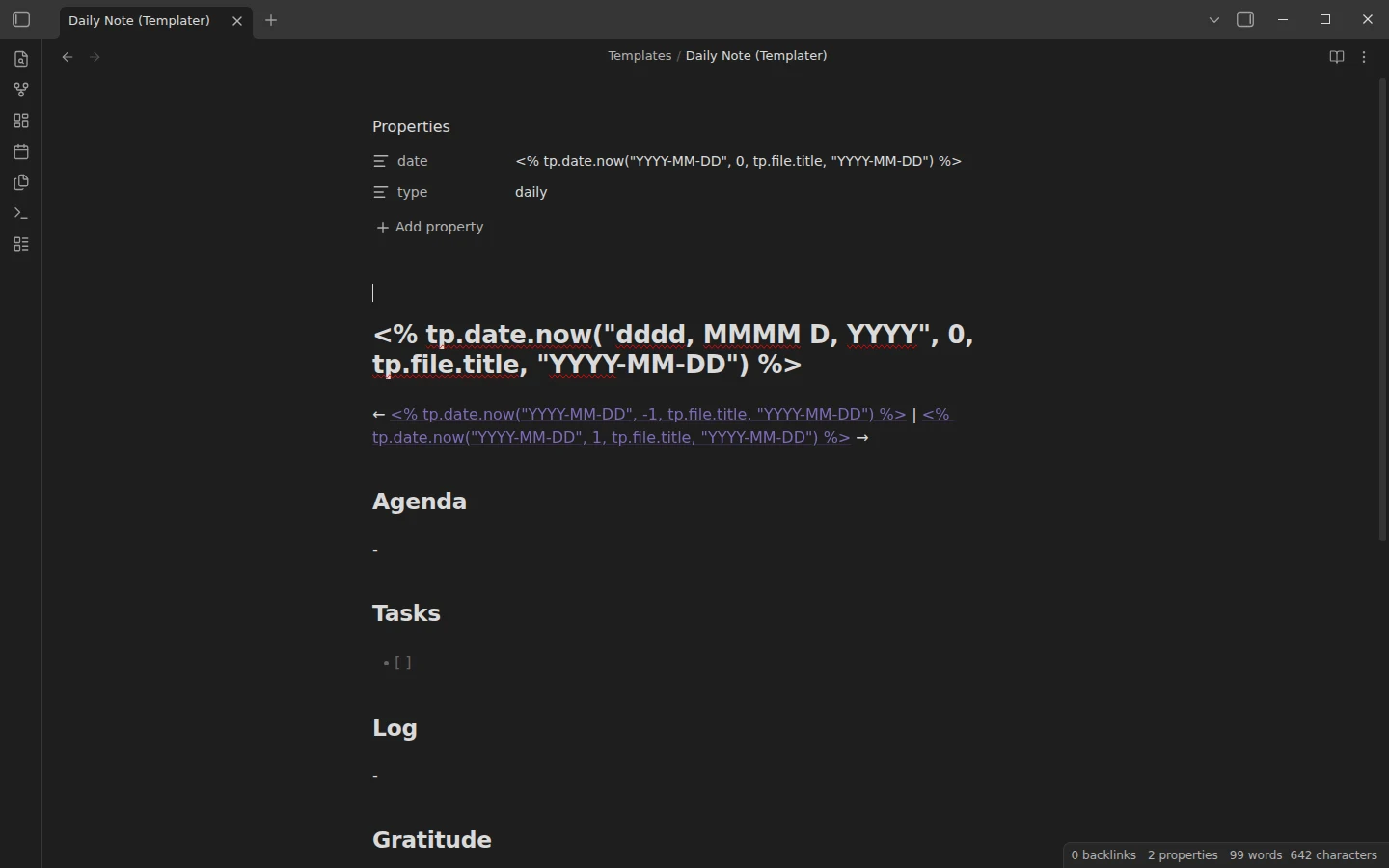
- Templates/ — two variants of the same daily note. Daily Note (core Templates) needs no community plugins at all. Daily Note (Templater) has the same layout plus automatic yesterday/tomorrow links computed from the file name.
- Start Here.md — a short tour of the vault and the first three things to do.
The core Daily notes plugin arrives preconfigured: new notes land in Daily/, named YYYY-MM-DD, pre-filled from the core template. Click the calendar icon in the ribbon and today's note exists.
How the daily note template works day to day
The four headings are deliberately plain so they survive busy days. Agenda holds the time-bound items, Tasks the day's checkboxes, Log is the diary part — what actually happened — and Gratitude closes the day with one or two lines. The habit that makes the note earn its keep: before closing, write tomorrow's top task in Tasks and one line in Log. Open any two example notes side by side to see how the prev/next links chain days together, and read the week start to finish to watch an open loop (a delayed shelving order) travel from Monday to Friday.
If your Log section keeps growing into paragraphs, the journal template is the long-form version of this idea; for the planning layer above the days, the weekly note template picks up where the daily note ends.
Plugins: none required, Templater optional
The core-only variant runs entirely on the Daily notes and Templates plugins that ship with Obsidian, both already enabled in the vault's settings. The one optional upgrade is Templater: install it, set Templates as its template folder, and point Settings → Daily notes at the Templater variant. From then on every new daily note gets working prev/next navigation, computed from the note's file name — so it works whether you open today's note or create one for next Tuesday. The example week already shows those links in action.
Obsidian Daily Note Template Examples to Adapt
The download covers the full agenda, tasks, log and gratitude layout. If you want something smaller, or a version for a working day, these variations drop straight into your template file. The minimal one uses core Templates syntax, so it needs no plugin:
# {{date:dddd, D MMMM YYYY}}

## Today
- [ ]

## Notes
-
The work version swaps the gratitude section for meetings and pulls in every task due today or earlier through a Tasks query, which needs the Tasks plugin:
# {{date:YYYY-MM-DD}}

## Meetings
-

## Due today
```tasks
not done
due before tomorrow
```

## Log
-
Previous and next day links with Templater
Templater can read the date from the note's own file name, so the links stay correct even when you create a note for a past day. Add this line near the top of the template:
<< [[<% tp.date.now("YYYY-MM-DD", -1, tp.file.title, "YYYY-MM-DD") %>|Yesterday]] | [[<% tp.date.now("YYYY-MM-DD", 1, tp.file.title, "YYYY-MM-DD") %>|Tomorrow]] >>Download the daily note template
The zip contains the complete vault: Markdown files plus a minimal, plain-JSON .obsidian/ folder — no binaries, no bundled plugins. Unzip and use Open folder as vault, or copy Daily/ and Templates/ into your existing vault and mirror the Daily notes settings; how to install a Vaultorial template walks through both paths step by step. The same files are mirrored on GitHub if you want to read everything before downloading. More daily systems live in the daily notes section.
More templates
-
 TTRPG Templates: D&D Campaigns & Worldbuilding Obsidian D&D Character Sheet: a 5e Template That Calculates Itself Free D&D 5e character sheet for Obsidian: ability scores in properties, and Dataview works out modifiers, skills, saves, Passive Perception and spell DC. View template →
 -
 Kanban & Project Management Templates Obsidian Gantt Chart Template: Timelines Drawn from Your Task Notes Free Obsidian Gantt chart template: tasks are notes with start and end dates, and a Dataview query draws a Mermaid Gantt chart per project, by phase. View template →
 -
 Meeting Note Templates for Work Obsidian CRM Template: A Personal CRM Vault with Contacts, Deals and Follow-ups Free Obsidian CRM template: contacts, companies, deals and dated interactions, with a Dataview dashboard for follow-ups, pipeline by stage and cold contacts. View template →
 -
 Obsidian for Work: Meetings, Projects, Clients and the Commercial License How to use Obsidian for work: one vault for meetings, projects, clients and tasks, whether you need the commercial license, and what teams can share. Read guide →